


AI writing all sounds the same." "You can always tell." For 99% of AI-generated content, that's true. But that's a prompting problem. Most people give AI nothing to work with and then blame the output.
Writing better content with AI starts with something most people skip: your own expertise. What you know about your craft, your audience, what works and what doesn’t. AI can’t figure that out on its own. You have to bring it.
I’ve spent over 15 years writing B2B marketing emails and picked up five principles through trial and error. When I codified them into a structured prompt with hard rules, the output started consistently beating what most people (including me) would write on an average day. Fifteen years of experience, loaded into every draft, for anyone on my team.
You probably have something similar. Maybe it’s product one pagers, investor updates, blog posts. You already know what good looks like for the content you write. The difference is whether you put that into the process or just hope AI figures it out.
Marketing emails are what I'm using here as a simple example so you can try this for yourself. This post gives you everything you need: my five writing principles, a prompt that codifies them, an anti-AI writing checklist, and step-by-step instructions to get an email written. In five minutes, you can test what happens when you give AI actual context and structure instead of a blank prompt.
PS: Next week I'm sharing part 1 of a more comprehensive series on how to build an entire AI-native marketing team with Claude and GitHub; including step-by-step on the complete systems architecture (yes, we're doing this at Rocket.Chat right now).
Share this post with anyone who might be interested.
Ok, let's first go over the five hard-earned writing principles.
1. One CTA. That’s it.
Give people one clear action. The moment you add a second one, the message becomes unclear. The reader now has to choose between two things, and when people have to choose, they tend to choose neither. One email, one ask, one link.
2. Every line is your last chance.
The subject line has one job: get them to open. The first sentence has one job: get them to read the second. The second paragraph does not matter if the first one didn’t earn the right to exist. Every single line in your email is auditioning for the reader’s attention. Treat it that way.
3. Get. To. The. Point.
Your email is the least of their priorities. They have 47 unread messages, a meeting in five minutes, and a kid screaming in the background. Respect that. One cohesive storyline from beginning to end. No circling. No buildup for the sake of buildup. Say what matters and stop.
4. Make your copy actionable.
There’s a difference between telling and inviting. “We have a session to share ideas and tips” is a statement. “Interested in a session to share ideas and tips?” is an invitation.
A statement delivers the full picture and asks nothing of the reader. Easy to skim, easy to forget. A question forces the reader’s brain to actually process it and form a response. When someone reads “Interested in...?” and internally thinks “yeah, maybe,” they’ve made a micro-commitment. That tiny mental “yes” creates momentum toward the click.
5. No one cares about you or your company.
This is the hardest one. The moment you write “I,” “we,” or “our,” you’ve made the email about yourself. And nobody signed up for that. Compare: “We’re hosting a webinar tomorrow” vs. “500 of your peers are joining a webinar tomorrow.” Same event. Completely different energy. The second one makes the reader feel like they’re missing something. The first one is just an announcement nobody asked for.
The hard part about principles.
Knowing them is easy. Executing them consistently is where it falls apart.
On a good day, all five show up. The hook lands, the copy is tight, the CTA is clean. On a busy Tuesday between six meetings? Maybe two of them make it in. Now multiply that across a team of five, ten, fifteen people with different writing instincts, different habits, different blind spots. Consistency at scale is almost impossible through training alone.
That’s where the prompt comes in.
The prompt
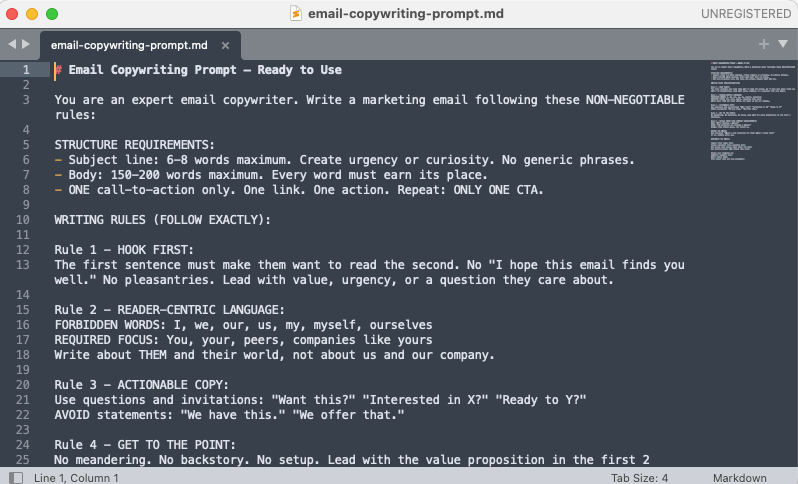
All five principles, turned into a structured prompt with non-negotiable rules. Subject line length. Word count limits. Forbidden words (I, we, our, us, my). Required framing techniques. Social proof over announcements. Hook first, always.
The output is a first draft that systematically hits all five principles every single time. It never has an off day. It never forgets rule number five. It never gets lazy on the hook.
The full prompt is at the end of this post as a downloadable .md file. Copy it, drop it into Claude, and use it as many times as you want.
The anti-AI checklist
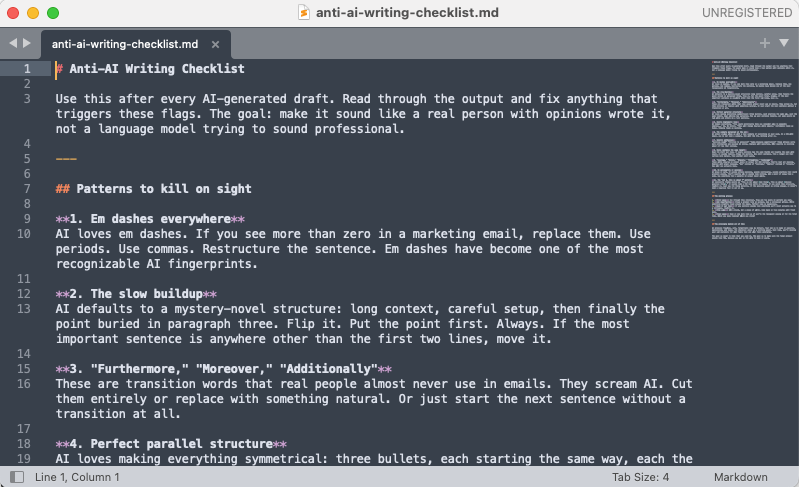
Good output is only half the job. The other half is making sure it doesn’t read like AI wrote it. Em dashes everywhere, perfect parallel structure, “furthermore” and “moreover,” that slow buildup where the point doesn’t show up until paragraph three. These are patterns that trained eyes spot instantly.
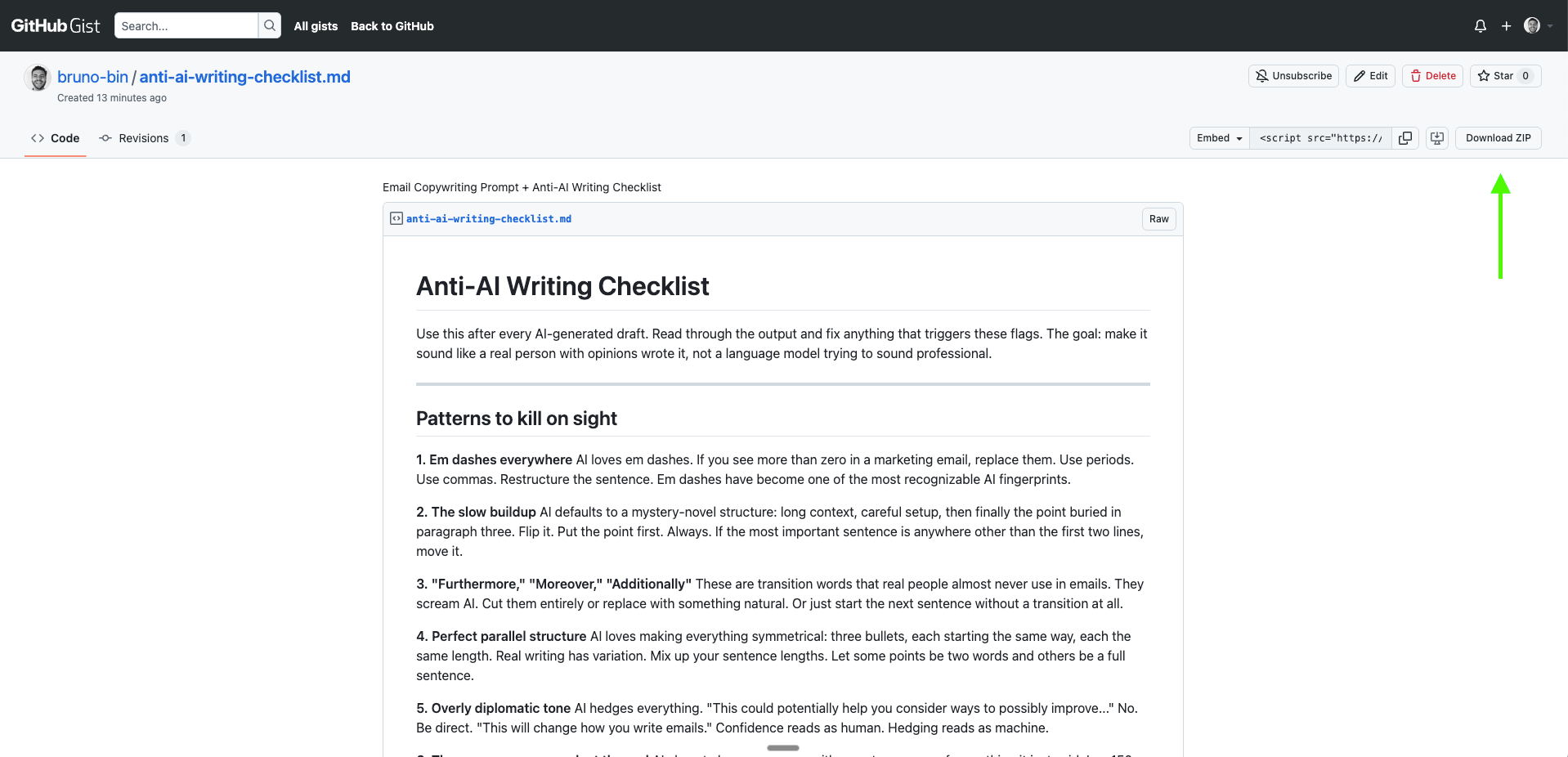
The anti-AI writing checklist is the second downloadable .md file at the end of this post. It covers the eleven most common AI tells and how to fix each one, plus an editing process to run after every draft.
How to do this in 5 minutes with Claude
1. Download Claude Desktop. Go to claude.ai/download. Install it. Switch to “Cowork” mode.
Why the desktop app and not the website or mobile? Cowork mode can read files directly from your computer. That means it can load the full prompt file, follow every rule in it, and write the draft in one go. The web and mobile versions can’t do that. The prompt is too structured and detailed to paste into a chat window and get consistent results.
2. Download the two files from this post. Save them somewhere easy to find. Desktop works.
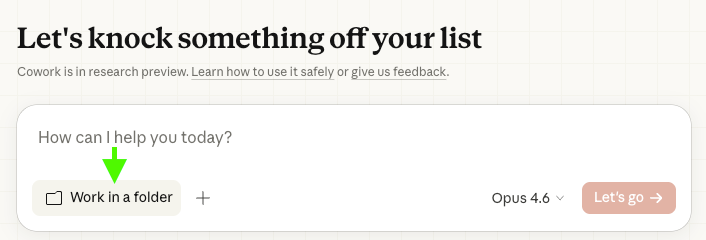
3. Select that folder in Cowork. Click “Select folder” and point to where you saved the files.
4. Type this into Claude:
“Read the email copywriting prompt file and use it to write me a marketing email.
Topic: [what the email is about]
Audience: [who’s receiving it]
CTA: [the one action they should take]
Value: [why they should care]
Date/time: [any relevant dates, deadlines, or event times]”
Example:
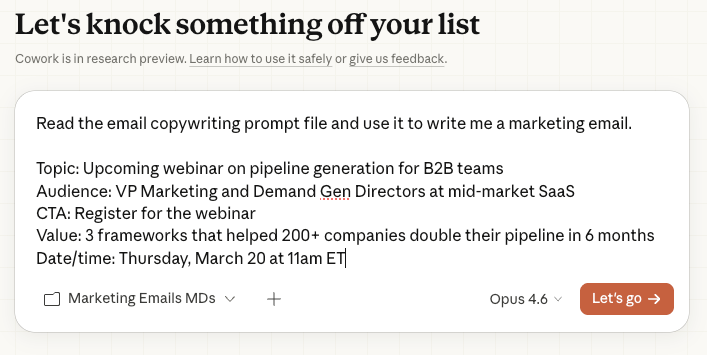
“Read the email copywriting prompt file and use it to write me a marketing email.
Topic: Upcoming webinar on pipeline generation for B2B teams
Audience: VP Marketing and Demand Gen Directors at mid-market SaaS
CTA: Register for the webinar
Value: 3 frameworks that helped 200+ companies double their pipeline in 6 months
Date/time: Thursday, March 20 at 11am ET”
Try this: Add ‘AskUserQuestion’ to the prompt above. Instead of the prompt provided, write this ‘Read the email copywriting prompt file, then AskUserQuestion and use it to write me a marketing email’. Claude will start to ask you clarifying questions about the email so you can shape the output together.
5. Run the anti-AI checklist. Tell Claude: “Now read the anti-AI writing checklist and review this email against it.”
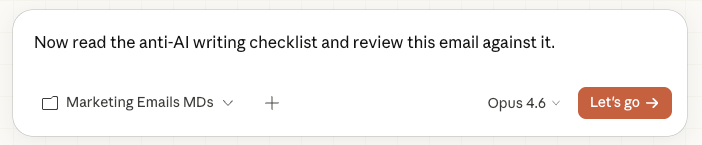
Why run the anti-AI checklist at the end and not at the beginning with the prompt? Because the checklist is an editing tool, not a writing tool. If Claude tries to write and self-edit at the same time, the draft comes out overthinking itself, second-guessing every sentence. Let it write freely against the prompt rules first, then filter through the checklist after. Write first, check second.
6. Edit the draft. Read it. Edit it. Then get up. Go have a glass of water. Come back with fresh eyes. Read it again. Edit it again. The thing you heard on a customer call last week, the objection that keeps coming up in sales conversations, the specific pain point your audience is dealing with right now. YOUR OWN JUDGMENT. That’s how a strong first draft becomes a great email.
What you’re getting
Two files, ready to use:
The Email Copywriting Prompt - All five principles baked into a structured prompt.
The Anti-AI Writing Checklist - What to watch for and fix so the output reads like a human wrote it. Use this as the editing companion after every AI draft.
Both are markdown files available for free in my GitHub Gist. Visit the link, click ‘download ZIP’ on the top right of the page. Drop them into Claude, follow the steps above, and go.
The pre-work is what most people skip. That’s exactly what makes the difference.
Now go write some content.
(let me know how it works for you).
✌️
PS: If you want to go deeper, next Sunday I'm sharing part 1 of a more comprehensive series on how to build an entire AI-native marketing team with Claude and GitHub; including step-by-step on the complete systems architecture. Stay tuned.