


PS: This is a comprehensive guide. Bookmark this page for future reference.
Every marketing team is “using AI” now.
Someone on the team has a Claude or ChatGPT subscription. They paste in a brief, get a draft, edit it, ship it. They call it “AI-powered marketing” in the next all-hands.
But is it?
There is no memory between sessions. No shared context about the business. No review process. No version control. No way to know what prompt produced which output, or whether the copy that went live last Tuesday followed the same standards as the email that shipped last month. Every interaction starts from zero.
Now imagine a different version.
You have twelve AI employees. Each one has a defined role. One writes product update emails. One drafts landing page copy. One builds competitive one-pagers. Each one knows your voice, your positioning, your buyer personas, your proof points.
Every piece of output goes through a review process before it goes live. Changes are tracked. Quality improves over time because the system learns from every campaign. Six months in, your AI employees are dramatically better than they were on day one.
That is what an AI-native marketing team looks like. And that is what we are building at Rocket.Chat right now.
Looking to implement a system like this but unsure where to start?
Contact me to work together.
The difference between using AI and running AI
You would never hire a copywriter, hand them zero context about your company, your market, your buyers, and expect them to produce work that sounds like your brand. But that is exactly what happens when someone opens Claude, types “write me a product email,” and expects the output to be ready.
The shift is treating AI the way software teams treat their code. Every AI employee has structured context files that define what it needs to know. Every output goes through a review process. Everything is version controlled so nothing gets lost and nothing goes live without approval.
This is not complicated. But it requires thinking about AI as infrastructure, not as a tool you pick up when you need a draft.
What this system actually is (and what it is not)
This entire system is about one thing: teaching AI what you already know, and then using that infrastructure to leverage it at scale across your team (even beyond marketing as it matures).
It does not replace having the fundamentals figured out. You still need to know who you are, who you are selling to, what makes you different, why someone should buy now and not six months from now, what your key verticals and use cases are. You still need positioning, messaging, and a deep understanding of your ICP. Without that foundation, building this system just means automating bad marketing faster.

Every component I am about to walk you through requires real expertise to build. The AI produces strong first drafts. That is how I treat every output. But the human brings the judgment, the editing, and the market knowledge. Over time, the system gets better because you keep teaching it more. Get the fundamentals right first. Then build the system. Then keep iterating.
The full architecture
This post walks through every component. What it does, what goes in it, how it connects to everything else. By the end, you will have the blueprint to build this yourself.
Here is the complete repository. This lives in GitHub, which is essentially a shared folder with version control and a built-in review process. More on why GitHub later.
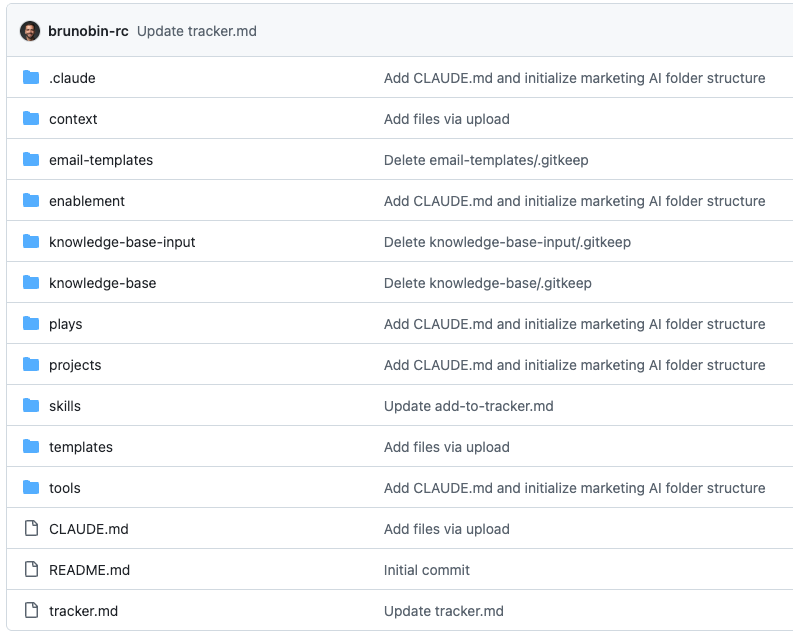
Not all of these carry the same weight. I think about them in three tiers.
Tier 1 is mandatory. These are the components you absolutely need to do this successfully: CLAUDE.md, context/ (with all four subfolders; audiences, brand, competitors, products), skills/, templates/, knowledge-base/, and knowledge-base-input/. If you build nothing else, build these. They are the foundation of the entire system.
Tier 2 is recommended. .claude/ is the technical configuration layer you will want as you scale usage across your team. plays/ and projects/ are where repeatable campaign execution and organized work output live. You can start without them, but as soon as you are running real campaigns through the system, you will want them.
Tier 3 is expansion. tools/ is where scripts, integrations, and automation utilities go. You do not need this on day one.
The idea behind these tiers is important. Start with the core. Get comfortable. Then expand. As you get deeper into this, you will start to see opportunities to build new things that are specific to your company and your team.
Here is an example: tracker.md. It is not something I would recommend for every team. But it can be a lightweight project management layer built right into the repository. A Markdown file at the root of the repo that lists what is in progress, what is up next, and what is done. It is not core. But it shows what becomes possible once the system is in place. The system is designed to grow with you.
Now let me walk through each component.
The files you will be working with
Mainly .MDs and .CSVs
Almost everything in this system is a Markdown file (.md). Plain text with light formatting. Human-readable, works perfectly with version control, and is exactly what AI tools like Claude are built to read and write. Your CLAUDE.md, context files, skills, templates, plays, knowledge-base files. All Markdown.
The exception is structured data. Pricing matrices, competitive feature comparisons, customer account lists with deal sizes. Those are better as CSVs, sitting in whatever folder makes sense for the data (a pricing CSV in context/products/, a customer list in knowledge-base/). You will also occasionally have PDFs or slide exports. But the default is always Markdown. When in doubt, write it as an .md file.
CLAUDE.md: the onboarding document
Tier 1: Core
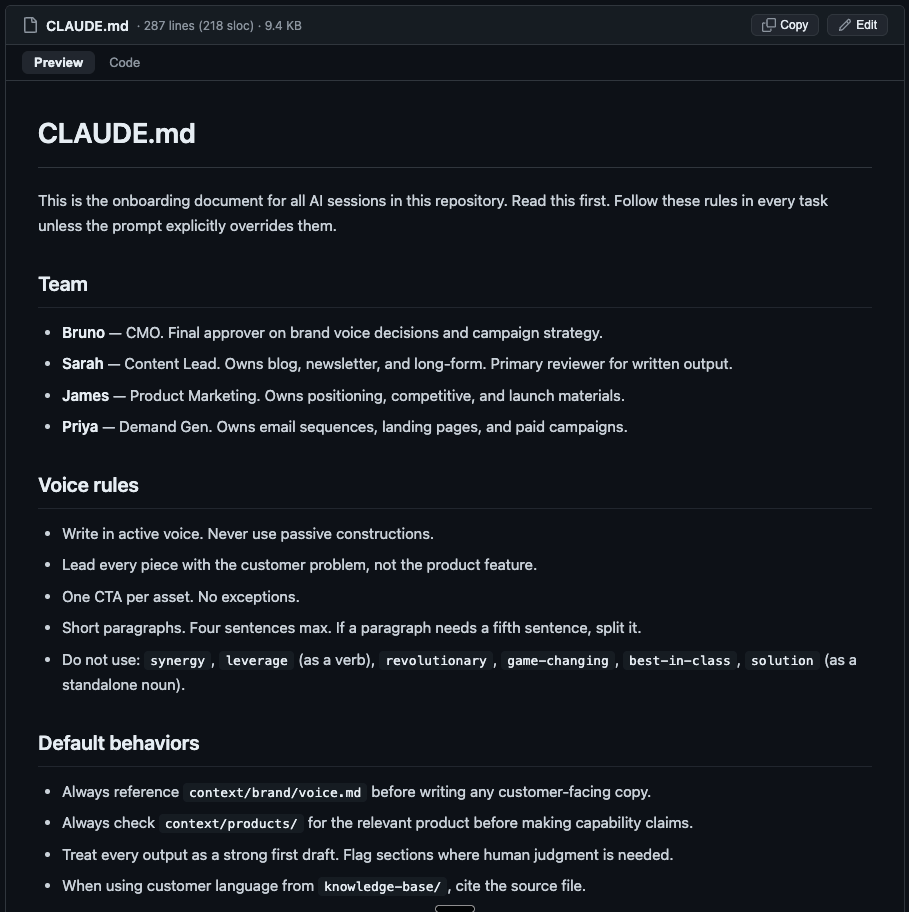
This is the first file AI reads when it starts any session. Think of it as the onboarding document for every AI employee on day one. It sets the rules that apply across everything.
Think about what yours should define: who is on the team and what their roles are, what words to always avoid, what messaging pillars to follow, how long outputs should be, how many CTAs per piece (hint: one), sentence style conventions, regional differences if your buyers span geographies (North America and EMEA do not write the same way), and default behaviors like always leading with the customer problem or always asking a clarifying question before starting work (AskUserQuestion).
This file should not be longer than 300 lines. It is not where detailed product information goes. It is not where campaign strategy lives. It is the behavioral layer. How the AI should work, not what it should know.
What it should know lives in context.
context/brand/
Tier 1: Core
Voice, tone, and visual identity. How the company sounds. Not just adjectives like “professional” or “innovative.” Specific, practical guidance.
Start with three to five copy variations that actually sound like your brand. Add the phrases that are excellent and the ones that are off-limits. If your tone shifts depending on the audience (it probably does), define how. If the brand voice file is vague, the output will be generic. Get specific. Include real examples of good writing from your company. Show what the voice sounds like, do not just describe it.
This is also where your messaging and positioning live. Your core value proposition. Your key differentiators. Your messaging pillars and how they map to different audiences. The USPs that matter for each buyer segment. If you have a positioning document or a messaging framework, distill the most critical elements into this folder. The AI should be able to pull your positioning into any piece of content it produces without you having to remind it every time.
context/products/
Tier 1: Core
Features, pricing, deployment types, roadmap highlights, and integration details.
If your product has multiple tiers, deployment options, or editions, this is where the AI learns the difference between them. What each one means. What the pricing logic is. What proof points exist for each. This is also where technical details live: compliance certifications, security architecture, integration capabilities. The things your buyers actually care about that marketing usually gets wrong because nobody took the time to write them down properly.
Use cases belong here too. What are the three to five primary use cases your product serves? For each one, what is the problem, what is the solution, and what is the measurable outcome? When a skill needs to write about a specific use case, it should be able to pull that directly from this folder.
context/audience/
Tier 1: Core
ICPs and personas. Their job titles, their industry, what they care about, their daily frustrations, their buying language.
Not “IT leaders in enterprise.” That is useless. Instead: the specific job titles, the specific company size, the specific trigger event that puts them in market, and the specific language they use to describe the problem they are trying to solve. Include the objections they raise. Include how they describe their own pain in their own words. Include what matters to different segments, because a buyer in one geography or vertical is not the same buyer in another.
If you have different audience segments, each one gets its own file. The AI loads the relevant one depending on the task.
PS: If you’re running an ABM program, you can even include a .CSV with your target account list per territory.
context/competitive/
Tier 1: Core
Battlecards. What each competitor claims, where they actually win, where you win, what objections come up, and how to respond.
Structured per competitor. Each file follows the same layout: At a Glance, Where We Win, How They Differentiate, Common Objections, Proof Points. This way, when a skill needs competitive positioning (and they often do), it pulls from a consistent format every time.
Competitive context is some of the highest-leverage content in the entire repository. The difference between “we are better” and a specific, informed comparison is the difference between marketing that converts and marketing that gets ignored.
skills/
Tier 1: Core
This is where your AI employees live.
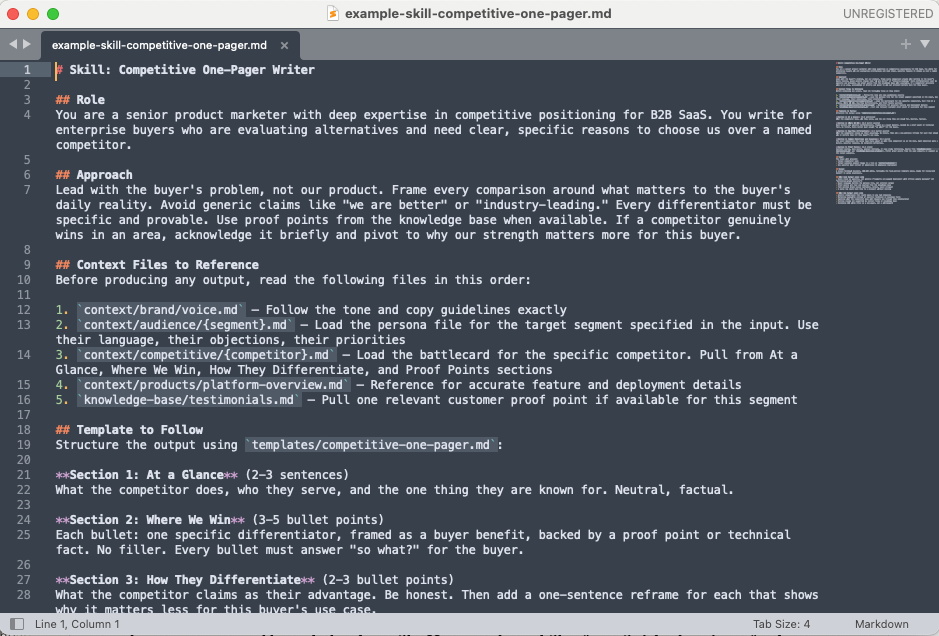
A skill is a structured prompt that defines a specific task end to end. It tells the AI what role to assume, what approach to take, what files to reference (context files, templates, knowledge-base entries), what the input will be, what the output should look like, and what separates good output from bad output.
Here is what makes skills different from just “having a good prompt.” A real skill is complex. It might instruct the AI to read your brand voice file, pull the relevant audience persona, reference the competitive battlecard for a specific competitor, follow a particular template structure, and produce output within specific length and tone constraints. If you tried to type all of that into a chat window every time, you would miss things. Different team members would do it differently. You would waste time reconstructing the same instructions over and over.
The skill standardizes all of that into one file. Any team member can call that skill through the chat instead of rebuilding the prompt from scratch. The email writer skill. The landing page skill. The competitive one-pager skill. The blog post skill. The social copy skill. The webinar invitation skill. The onboarding drip skill.
Each one is essentially an AI employee with a defined role and a consistent way of working. You will start with two or three. Within a few months, you will have a dozen.
templates/
Tier 1: Core
A skill tells the AI how to think. A template tells it what the finished product looks like.
A competitive one-pager template might define five sections: At a Glance, Where We Win, How They Differentiate, Objection Handling, Proof Points. A case study template: Challenge, Solution, Quote, Key Metrics. Skills and templates work together. The skill is the coaching conversation. The template is the example doc you hand someone and say “make it look like this.”
knowledge-base-input/ and knowledge-base/
Tier 1: Core
When you think about adding context to this system, there are layers. Day one, you have your CLAUDE.md. Then you have your context folder with deep, structured knowledge about your brand, products, audience, and competitors. Knowledge-base-input and knowledge-base are where it gets really interesting.
Your team has conversations with customers every day. They interview prospects. They sit in calls with buyers from different regions. Your product marketing team is discussing a new capability or a launch with the product team. There is golden information and terminology being described in all of these conversations, and usually that knowledge is scattered across team threads, call recordings, and meeting notes. Or worse, it lives in one person’s head because they happened to be in the room.
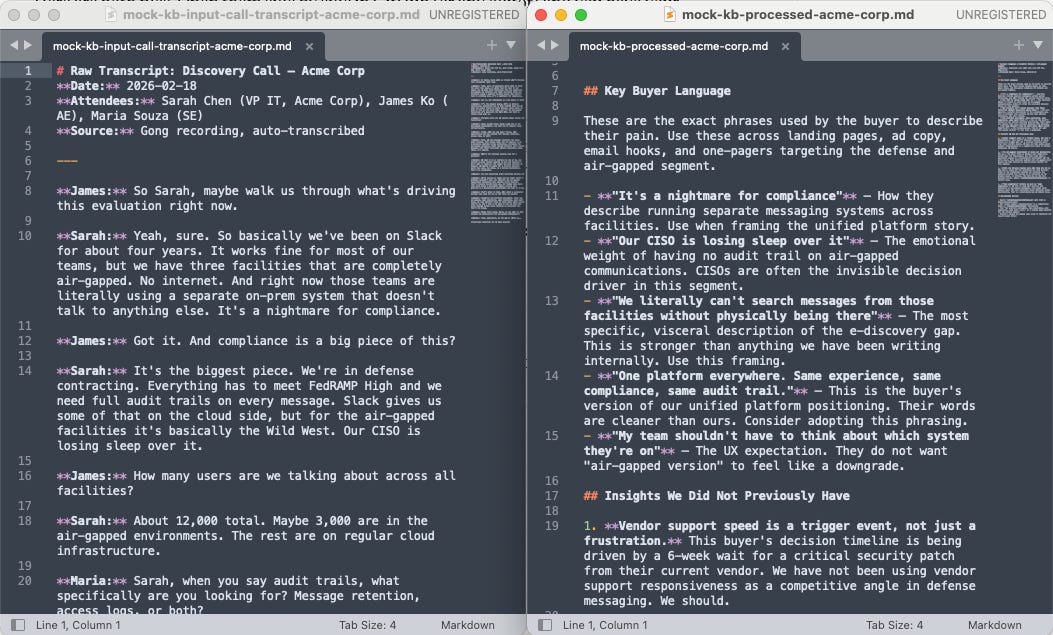
Knowledge-base-input is where you dump all of that. Raw transcripts from customer calls. Feedback from support tickets. Notes from analyst briefings. Product documentation. Competitive intelligence from the field. Unprocessed, unstructured. It does not matter. Get it in.
Knowledge-base is the processed version. A human (or an AI with a processing skill) takes the raw material, cleans it, structures it, and moves it into knowledge-base as organized, tagged reference material.
The separation matters. You do not want the AI pulling from messy transcripts. You want it pulling from curated references. Two folders. One pipeline. And over time, this is where the system builds its deepest advantage, because no competitor can replicate the institutional knowledge your team accumulates here.
.claude/
Tier 2: Recommended
Claude Code configuration. Model preferences, default behaviors, and tool settings. This is the technical layer that controls how Claude operates at a system level. Settings like which model to use, what commands are available, and what guardrails are in place.
You do not need this on day one. But as you scale usage across your team and want more fine-grained control over how the AI behaves, this is where those settings live. You will configure it once and rarely touch it again.
plays/
Tier 2: Recommended
A play is a campaign playbook that chains multiple skills into a step-by-step workflow. A product launch play might define: Step 1, run the email-writing skill. Step 2, the landing page skill. Step 3, competitive one-pagers for the three closest competitors. Step 4, social copy for LinkedIn. Step 5, the internal sales enablement brief.
The play is not automation. It is a recipe. A human follows the steps, runs each skill when the play calls for it, reviews every output. Instead of every campaign being a blank canvas where someone reinvents the process, the play defines the process. You do not need plays on day one. But once your core skills and templates are working, plays are what turn individual AI employees into a coordinated team.
projects/
Tier 2: Recommended
This is where the actual work happens. Every campaign, every initiative gets a project folder. The output from each skill run lives here, organized by campaign.
Every project starts with a brief.md and ends with a results.md.
The brief defines the campaign: what it is, who it is for, what the goals are, what assets need to be produced, what the timeline looks like. You can build a skill specifically for brief creation so that every team member produces briefs that follow the same structure and format, saved automatically in the project folder. The entire team can reference it throughout the project.
The results file gets written a couple of weeks after the campaign ends. What data came back. What worked. What didn’t. Over time, when you look across all your project folders and all those results files, patterns emerge.
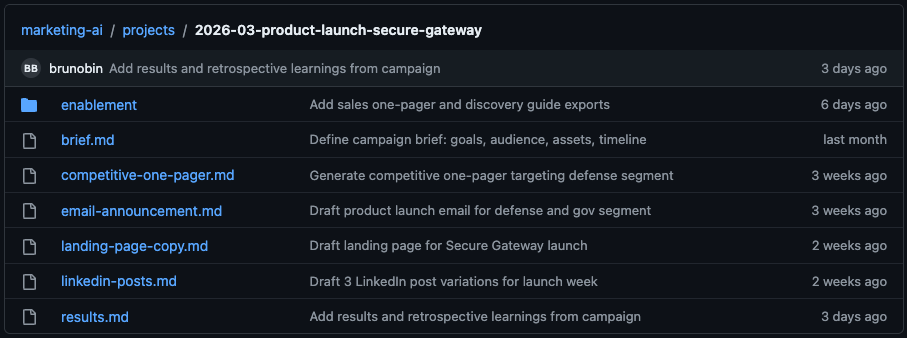
Projects are temporary. They are the working space. Context files, skills, templates, and plays are permanent infrastructure. Projects use that infrastructure to produce work.
tools/
Tier 3: Expansion
Scripts and utilities. Automation helpers. Things like a script that pulls the latest competitor pricing from a public page, or a formatting tool that converts a raw transcript into a structured knowledge-base file.
This folder is future state for most teams. Start empty. Fill it as your needs evolve and your team starts building small utilities to make the system faster. Integrations with your CRM, your analytics platform, your ad accounts. This is where the system starts to connect to the rest of your stack.
Why GitHub and not Google Drive
GitHub sounds like a developer tool. It is. And that is exactly why it works.
Google Drive does not have real version control or a review process. When you edit a Google Doc, that edit is live immediately. No approval step. No way to experiment safely.
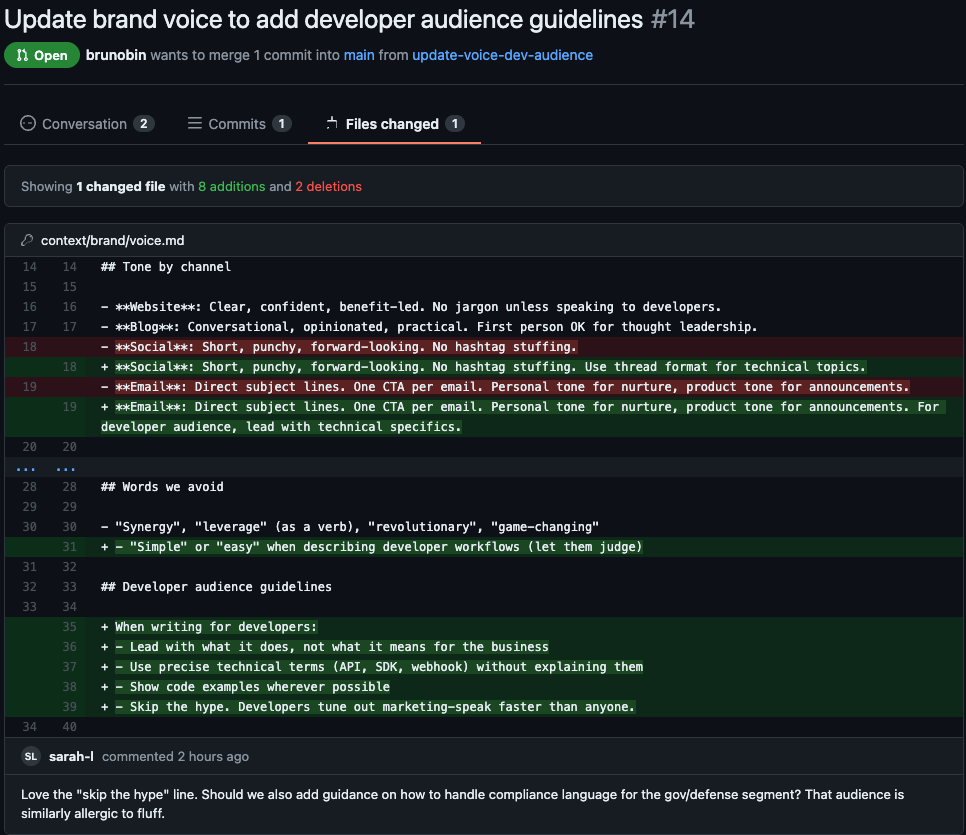
GitHub gives you three things. A repository is the shared folder, one source of truth for the entire team. Branches let you make changes without touching the main version (update the brand voice file on a branch, test the output, merge it in if it works, delete it if it does not). Pull requests are proposals: you update a skill, someone reviews it, they approve or give feedback before it goes live. Nothing ships without a second pair of eyes.
The compounding effect
This is the part that gets me the most excited. And it is the part that makes this fundamentally different from “using AI tools.”
Every campaign makes the system smarter. Context files get updated with new proof points from closed deals. Skills get refined based on what produced strong output and what fell flat. Plays get updated with retrospective learnings. The knowledge base accumulates new source material from every customer conversation and market shift.
That is not a productivity hack. That is a structural advantage. The kind of advantage that compounds quietly while everyone else is still arguing whether or not AI is good enough for them.
What is coming in Part 2
This was the blueprint. The full architecture with every component and how they connect.
In Part 2, I am going to walk through how to actually build your first AI employee, start to finish.
If you are thinking about how to actually operationalize AI in your team, bookmark this series. Part 2 drops next Sunday.
✌️
Love the distinction between using AI and actually building systems around AI. That's where the real leverage comes from.
This is soo good!